


Marketing automation for tax advisers
Every Budget, deadline and rule change sends people searching for a clear answer, and the adviser who gives it is the one they call. Maggie, your AI CMO, writes those explainers for your website, LinkedIn and Google Business, and you review every one.
Free to start · No credit card · 30 free posts
Used by 600+ users and trusted by teams at
aeglesriphal.com
moonlakespa.com
shop.theteagroup.com
clo100.com
logtrics.io
mymorez.com
nextidal.com
otisapp.com
storaitelling.com
theheatpumps.co.uk
web-translations.com
exposeai.tech
orielipo.com
whitelabelcrowd.fund
elliptic.co
med.moonlakespa.com
netdex.co.il
orawellness.uk
reenest.com
syngage.ai
thepenthouseliving.com
zengolf.studio
imaintain.uk
rebuildingsociety.com
aurasocial.world
goaimex.com
moneyparents.com
newgenrenewables.uk
osmosisai.co
saunders.ac
teeza.app
thursdayclub.com
Why tax advisers struggle to keep their marketing going
Your busiest months are the ones when people most want to hear from you, and your words have to be exact.
January leaves no time to write
In the run-up to the Self Assessment deadline you're chasing paperwork and filing returns late into the evening. That's exactly when people are searching for help and your website says nothing new.
Budget day changes everything
The day after a Budget, landlords, directors and families all want to know what it means for them. By the time you've written it up, the firms that posted first have the readers.
Nothing can read like personal advice
A post that sounds like advice on someone's own situation, or promises a saving, can mislead a reader and fall foul of your professional standards. So drafts sit unpublished.
Referrals don't fill every gap
Accountants and solicitors send you work, but people with an inheritance question, a property sale or a move abroad search first. If you're not there, they find someone who is.

The Budget was on Wednesday, and your explainers are live by Friday.
It's the Thursday after the Budget. Your phone has been ringing with clients asking what the changes mean for them, and your website's last article is about the previous one.
You paste your firm's website into cmo.so. Maggie reads it and writes your brand profile: your work on personal tax, property, inheritance and owner-managed businesses, the landlords, directors and families you advise, what sets you apart from a general accountant, and the precise, reassuring way you explain things. You turn on Content Policy Guard for financial rules and add your own: no post may read like advice on a person's own affairs or promise a tax saving.
By Friday morning the drafts are waiting, each with a picture in your firm's look: a blog post explaining the main changes for landlords in plain English, a LinkedIn post from a partner on what directors should review before the tax year ends, and a Google Business update for people searching for a tax adviser nearby. Content Policy Guard has held one sentence that read like a promise of a lower bill, with a suggested rewrite. You check the figures against the Budget documents, approve two posts and edit the third.
They go out at the times you set for each channel, and each comes back with its link. Next week Maggie plans the posts for the run-up to 5 April, and Search Console in cmo.so shows which explainers people are finding.
Clear tax explainers, without losing your busy season
Each of those problems has an answer, and a qualified person at your firm still has the final word.
Answers to the questions people search
Blog posts that explain deadlines, reliefs, property tax, inheritance and changes in each Budget in plain English, written for Google and for AI answers. Published to your WordPress, Wix, Webflow or Shopify site, or any site through the cmo.so API.
Blog on autopilotFinancial rules, checked before you read
Turn on Content Policy Guard and posts are checked against financial rules, or your firm's own. A risky post is held as a draft with a suggested rewrite. These are AI suggestions, not legal or compliance advice.
Content Policy GuardReady before the tax calendar
The Self Assessment deadline, the end of the tax year on 5 April, payments on account, Budget day. Posts are planned around the dates that matter, so they're queued before you're busy.
Planned aheadYour specialisms, in your voice
Enter your website and Maggie builds your brand profile: services, clients, what makes you different, competitors and voice. Personal tax, property or business owners, every post starts from it.
Brand profileFound locally and by referrers
Regular Google Business posts keep your firm visible to people searching for a tax adviser near them, and LinkedIn posts reach business owners, accountants and solicitors who refer work.
Google Business and LinkedInEvery post waits for a person
By default nothing goes out until you approve it. Read and edit drafts in the web app, the iPhone app, or inside ChatGPT and Claude, and keep approvals on for every channel.
ApprovalsYour marketing team, in your pocket
Real screens from the cmo.so app on iPhone.
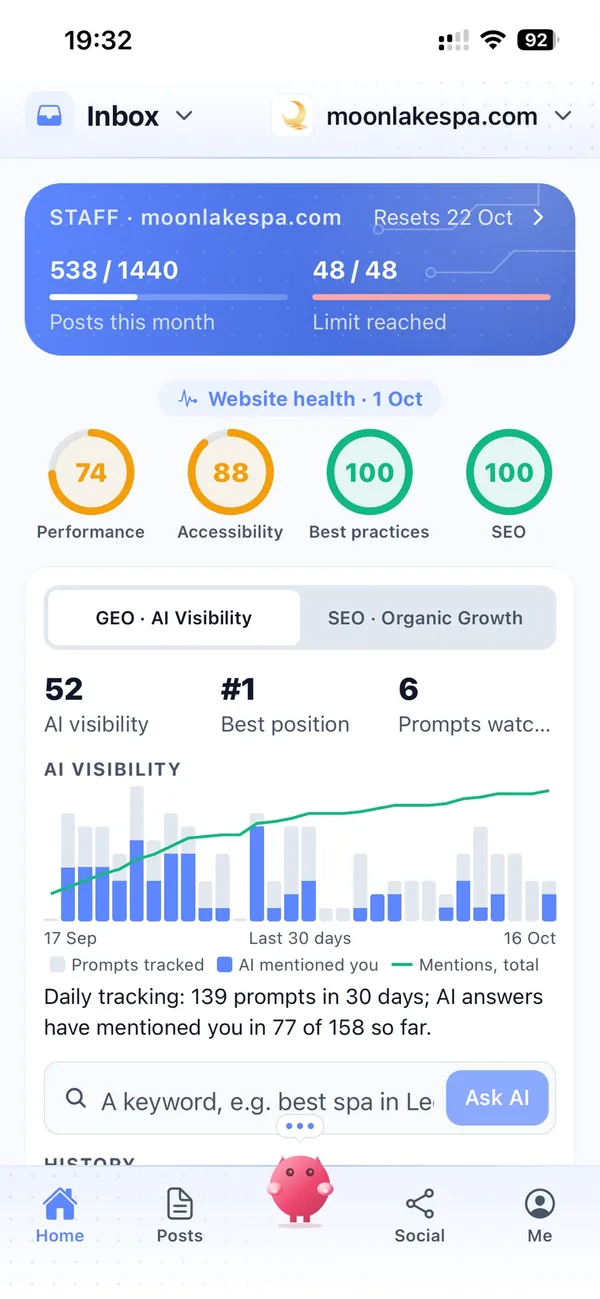
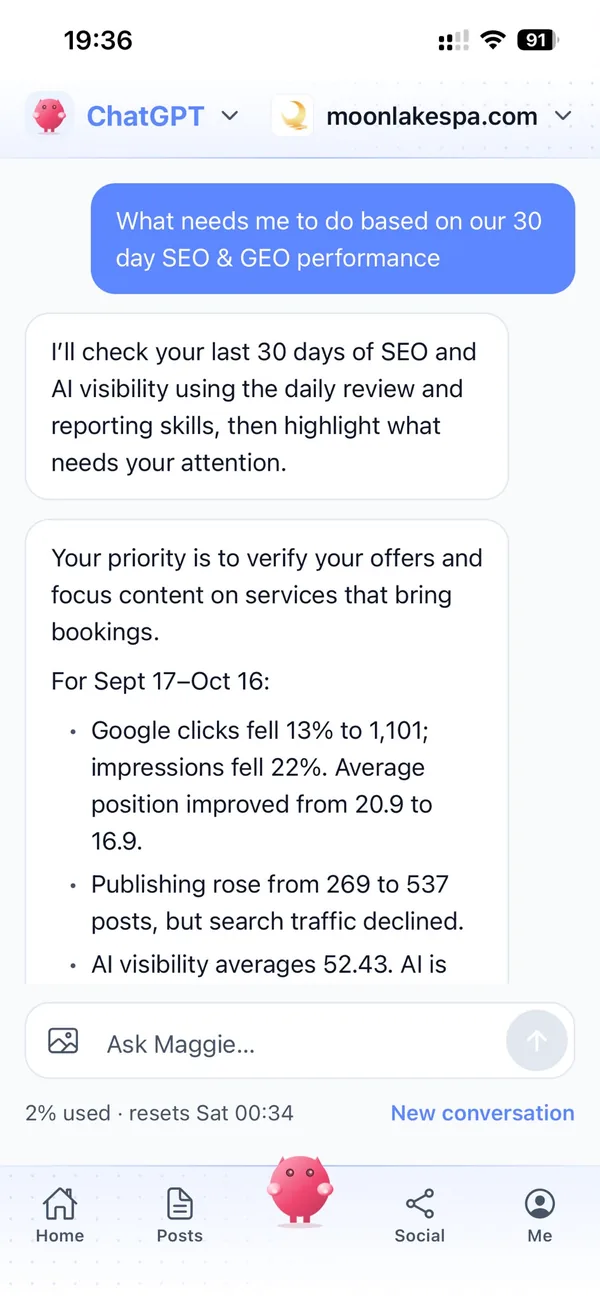

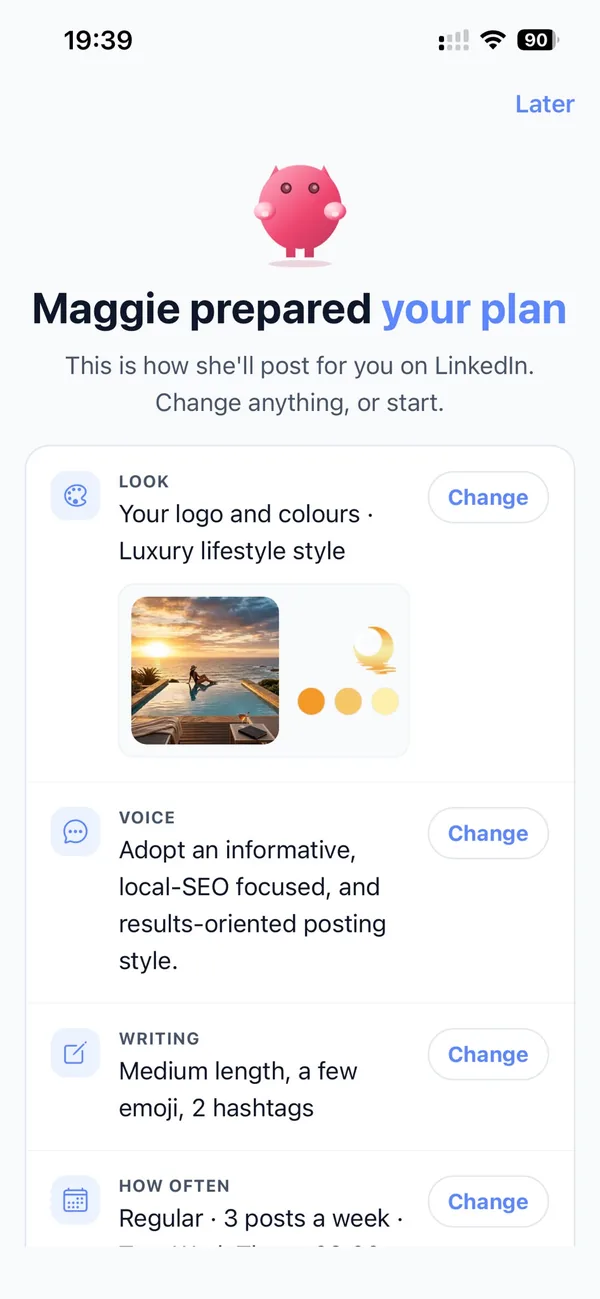
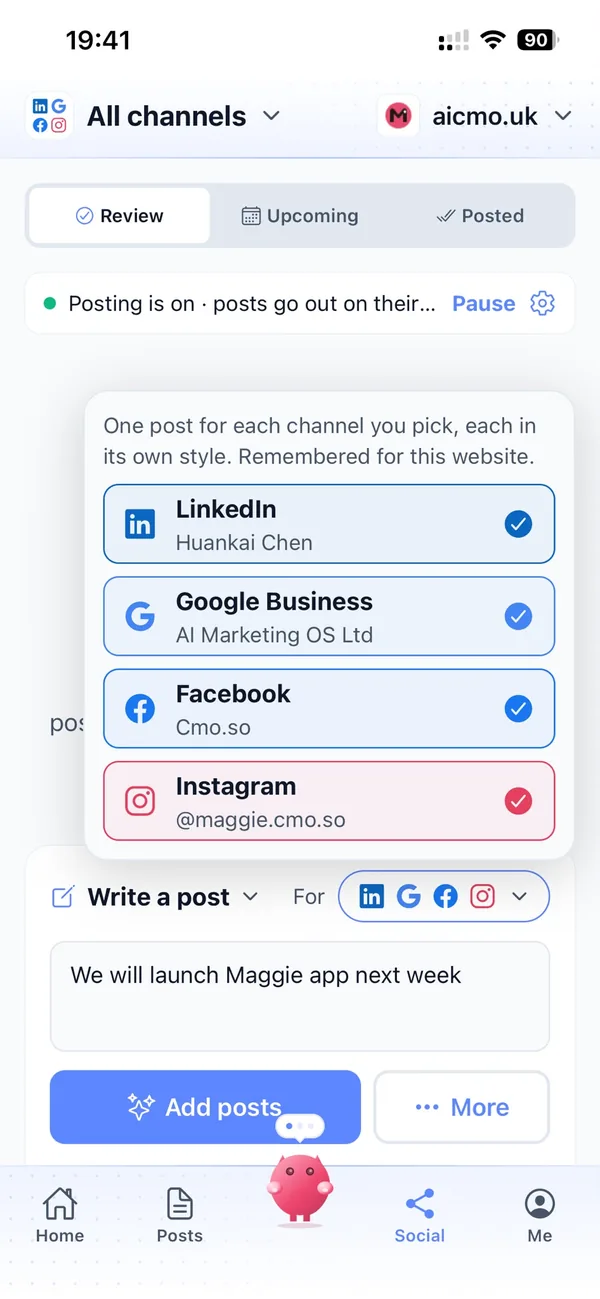
From your firm's website to reviewed tax explainers in four steps
Enter your website
Maggie reads it and drafts your firm's brand profile in minutes.
Set your rules
Turn on Content Policy Guard for financial rules and add your own, such as never promising a tax saving.
Review every draft
Explainers for your blog, LinkedIn and Google Business arrive with pictures. Approve, edit or skip each one.
Publish what you approved
Approved posts go out on your schedule and each one comes back with its link.
Why not just…
The usual ways tax advisers try to get their name out, and where each one runs out.
…rely on referrals from accountants?
Referrals bring good work, but only from the people who already know you. Clear explainers on your website and LinkedIn bring the people who search first, and give referrers something to share.
…send a Budget newsletter?
A newsletter only reaches people already on your list, and it's gone once read. Articles on your own site keep being found by people searching for the same answer for months.
…pay a financial marketing agency?
SEO and content agencies often cost around £1,000 a month, and you still check every figure yourself. Maggie drafts every week from £15 a month.
…write it with ChatGPT?
You still brief it, check it, make the picture and post it yourself, and it doesn't know your specialisms or your rules. Maggie remembers your firm and holds a risky line for review.
Cut the £5,900/mo marketing bill to £15/mo
Everything a marketing team does, done by Maggie.
| What needs doing | Without cmo.so | With cmo.so |
|---|---|---|
| Full-time marketing hire | £3,000/mo | Included |
| SEO and AI search (GEO) agency | £1,000/mo | Included |
| Content writer, AI-assisted | £500/mo | Included |
| Social media manager, freelance | £800/mo | Included |
| Designed pictures for every post | £300/mo | Included |
| SEO and GEO softwareRank tracking, site audits, AI visibility | £250/mo | Included |
| AI writing and image tools | £50/mo | Included |
| Working hours | Office hours | 24/7 |
| Total per month | £5,900+ | From £15/mo |
Typical UK costs for a small business in 2026, with AI already cutting freelance rates. Estimates only; your own quotes will vary.
- 5 social posts, 30 once verified
- 15 Maggie messages a day
- Upgrade any time
- 12 posts a day
- 150 Maggie messages a day
- All channels
- 96 posts a day
- 1,000 Maggie messages a day
- All channels
Per website, billed monthly. Blog and social posts share one allowance; your best plan sets how much you can talk to Maggie across all your websites.
Marketing automation for tax advisers: your questions
Still unsure?
What is marketing automation for tax advisers?
It's software that does the repeating work of marketing a tax practice: planning topics around the tax calendar, writing blog and social posts that explain changes and deadlines, making pictures and publishing on schedule.
With cmo.so, Maggie does all of it from your firm's website, and nothing goes out until a person at your firm approves it.
How do tax advisers get more clients online?
Tax advisers get more clients online by explaining the changes and deadlines people search for, clearly and quickly, on their own website, LinkedIn and Google Business profile, so they're found when someone needs help.
Maggie writes those explainers every week for your specialisms, and Search Console in cmo.so shows which ones bring people to your site.
Is it safe to use AI to write about tax?
It is safe when a qualified person reviews every post before it is published. cmo.so keeps approvals on by default, and Content Policy Guard can hold a post that may break financial rules as a draft with a suggested rewrite.
Content Policy Guard gives AI suggestions, not legal or compliance advice. It does not make a post compliant with your professional standards on its own, and your firm stays responsible for what it publishes.
Will the figures in posts be right?
Posts start from your website, your brand profile and the topic you approve, but tax rates and thresholds change, so a qualified person should check every figure before approving.
You can edit any number in a draft, and Maggie learns from your edits. You can also ask for figures to be left out and link to the official source instead.
How do we stop posts reading like personal advice?
Add your own rule to Content Policy Guard, such as no post may read like advice on someone's own tax affairs or promise a saving, and a post that may break it is held as a draft with a suggested rewrite.
Your brand profile can also set the tone: general explainers that invite readers to get in touch about their own situation.
Can posts be ready for Budget day?
They can follow it quickly. Once the Budget is announced, tell Maggie which changes matter to your clients and the drafts arrive with pictures for you to check.
Before the Budget, she can queue general posts on what to review before the tax year ends, so your channels aren't quiet while you wait.
Which channels should tax advisers start with?
Most start with their own blog for explainers people search, LinkedIn for business owners and referrers, and Google Business for people looking for a local adviser.
You can connect more channels at any time; each has its own posting times and queue, and one idea can become a post for every channel, written in each one's style.
How much does marketing automation cost for a tax adviser?
There's a free plan with no card needed. Paid plans are per website and billed monthly: Air at £15 a month covers two posts a day, which suits most small practices, and Pro at £45 a month suits a growing firm on several channels.
Founding members get lower prices for good on every plan until 1 January 2027. You can cancel any time.
Do we need to share client information?
No, there's no need to. cmo.so works from your public website and the brand profile you check, and it doesn't connect to client record systems.
cmo.so never sells or rents your data, and Search Console data is never used for advertising or to train AI models.
We also do accounts work. Can cmo.so cover both?
It can, from one brand profile that lists all your services. Maggie plans topics across them, so tax explainers and accounts posts each get their turn.
If the tax practice has its own website, add it to the same account with its own brand profile, channels, schedule and approvals.
Can my team approve posts too?
Yes. In Me → Team you can add people and choose what each can see or change, using presets such as editor or manager.
So a partner can approve LinkedIn posts while a senior adviser checks the figures in each blog post.
Which websites does it work with?
cmo.so publishes to WordPress, Shopify, Wix and Webflow, and to any other website through the cmo.so API.
Each post is reported back with its link once it is live.
Be the clear answer after every Budget
Enter your website. Your brand profile and first explainers are ready in minutes, and nothing goes out until you approve it.
- Free plan, no card needed
- You approve every post
- Cancel any time