


Your marketing in any AI assistant with the cmo.so MCP server
Check your results, review your LinkedIn and Facebook queue and manage blog ideas and drafts from the assistant you already use. Every change shows a preview first and only runs when you confirm it.
npx -y @cmo-so/mcp- @cmo-so/mcp
- Version 0.7.5
- Licence MIT
- Node >=20
- Downloads 337 last month
- Updated 18 Oct 2026
Hosted at https://mcp.cmo.so/mcp · Free cmo.so account to start
Hosted, local or one line in Claude Code
The same tools either way. Pick the hosted server unless your tool only runs local servers.
Set it up in your tool
Pick your tool, copy the snippet and paste it where the note says. The hosted server signs you in with your cmo.so account the first time a tool is used.
claude mcp add --transport http cmo-so https://mcp.cmo.so/mcp

# or run it locally (sign in first with: npx @cmo-so/cli login)
claude mcp add cmo-so -- npx -y @cmo-so/mcp{
"mcpServers": {
"cmo-so": { "url": "https://mcp.cmo.so/mcp" }
}
}{
"servers": {
"cmo-so": { "type": "http", "url": "https://mcp.cmo.so/mcp" }
}
}https://mcp.cmo.so/mcpnpx @cmo-so/cli login
{
"mcpServers": {
"cmo-so": { "command": "npx", "args": ["-y", "@cmo-so/mcp"] }
}
}{
"mcpServers": {
"cmo-so": {
"command": "npx",
"args": ["-y", "@cmo-so/mcp"],
"env": { "CMO_API_KEY": "cmo_…" }
}
}
}The server never shows your keys or other people's data, and it doesn't sell plans: upgrades happen in the cmo.so app.
Nine things to ask first
Copy one into your assistant once cmo.so is connected. Questions run straight away; anything that changes something shows you a preview first.
“What needs me on my website this week?”
Reads your inbox: posts waiting for review, failures, setup steps and low quota.
“How did my marketing do in the last 30 days?”
Posts published, ideas waiting and your AI visibility score, in one summary.
“Show my LinkedIn posts waiting for review”
Lists the queue with each post's text, so you can approve or skip from the chat.
“Approve the LinkedIn post about our spring offer”
Shows the approval and when it goes out, then waits for you to confirm.
“Come up with 5 blog post ideas about my services”
Maggie writes ideas from your brand profile; the preview says it uses AI generations.
“Which of my pages get clicks but rank on page two?”
Reads your Search Console queries and points to pages worth refreshing.
“Pause my blog autopilot until Monday”
Previews the pause; nothing stops until you confirm.
“Plan my LinkedIn posts for next week around a launch”
Drafts a week of posts into your queue for review, without scheduling anything yet.
“What does Maggie remember about my brand voice?”
Reads your Maggie Memory for this website, so the assistant writes the way you like.
Every tool the server offers
Read straight from the code that runs the server, so this list is always the current one. Each line is the tool's own description, as your assistant reads it; it only sees the tools your account and plan allow.
workspaces_listList the websites (workspaces) this user can manage.Readsprofile_getThe signed-in person: name and email.Readsmaggie_usage_getHow many messages to Maggie and AI generations (ideas, LinkedIn drafts, voices) are left today, and when they reset.Readswebsite_addAdd a new website for Maggie to work on: she reads it and builds its business profile (takes a few minutes).Asks firstworkspace_summaryThe current website: the user's role and permissions, plan, quota left, and the blog autopilot (on/off, paused, platform, posts per day).Readsinbox_listWhat needs the user now: LinkedIn posts to review, failures, setup steps, low quota, pauses.Readssetup_status_getHow far setting up this website has got: Maggie's reading steps, whether it is verified, whether it is connected for publishing, and whether the user can edit its profile.Readsconnect_guides_getHow to connect this website for publishing, per platform (WordPress plugin or push with an application password, Shopify, Wix, API): the steps, what to prepare (keys, permissions) and the setup page.Readsconnect_form_openGive the user the cmo.so app's own form to connect this website for publishing: WordPress (the AI CMO plugin or an application password), Shopify (Dev Dashboard app client ID and secret), Wix (API key), api (any site, by API) or vibe (a site they build with an AI coding tool such as Claude Code, Codex or Cursor: install CMO.so there and paste one prompt). In the app chat it shows a button under your message; elsewhere it returns a link. The details go from the form straight to CMO.so: never ask for them in chat.Readsverify_email_startProve the user owns the website: send a 6-digit code to a work email at the website's own domain (free email providers are refused).Asks firstverify_email_confirmCheck the 6-digit code the user received and verify the website.Asks firstdns_record_getProve the user owns the website by DNS: the exact TXT record (name and value) to add at their domain's DNS provider.Readsdns_verify_checkLook for the DNS TXT record now and verify the website if it is there.Asks firstwordpress_plugin_getThe AI CMO connector plugin for WordPress: latest version and its download link, install guide, and whether this website already runs it (version, up to date, key added, enabled).Readshandoff_to_desktopEmail the user a link to finish something on a computer: connecting their website (optionally for one platform), claiming or verifying by DNS, team, API keys or advanced settings.Asks firstmaggie_actions_listWhat Maggie has changed for this user on this website (newest first), with the result of each.Readsplan_quota_getThe plan for this website and what is left: posts this month and today.Readsdashboard_linkA link to the screen in the cmo.so app (app.cmo.so) for things the user does there themselves: team (add or remove people, change access), api_access (create or revoke API keys, disconnect apps), autopilot (publishing settings), report (full reports), rewrites (rewrite queue, find articles in the sitemap), brand_voices; account (email and password) is on ai.cmo.so.Readsapi_keys_listThe user's API keys: name, first characters, read or read-write, last used.Readsconnected_apps_listApps connected to the user's account (ChatGPT, Claude, the cmo.so app…), what they may do and when they were last used. `current` is the one in this conversation.Readsconnected_app_revokeDisconnect an app from the user's account (from connected_apps_list); it stops working at once and has to be connected again.Asks first · can't undoinvoices_listThe user's latest invoices across the subscriptions they pay for: date, amount, status and a link to view or download each.Readsprofile_updateChange the user's display name (the only profile field Maggie changes; email and password are on ai.cmo.so).Asks firstnotifications_getWhich app notifications the user gets: LinkedIn posts to review (social_review), LinkedIn posts that failed (social_failed), new blog posts published (published).Readsnotifications_setTurn app notifications on or off by kind; only the kinds sent change.Asks firstresults_summaryResults for the current website: posts published, ideas waiting, AI visibility average.Readsai_visibility_getAI visibility: how often AI answers (Google AI Mode and similar) mention or cite the website.Readsgsc_status_getWhether Google Search Console is connected for this website and when its numbers were last fetched.Readsgsc_connect_linkA Google sign-in link for the user to connect Google Search Console for this website (or reconnect).Asks firstgsc_performance_getGoogle Search Console for the period (30d, 90d or 12m): clicks, impressions, CTR and average position, with the change against the period before (clicks and impressions as a ratio: -0.25 = 25% fewer, null when there was nothing before; ctr in points as a fraction; position in places, lower is better), the daily trend and the top pages.Readsgsc_queries_getSearch queries people found the website with.Readsgsc_syncFetch fresh Search Console numbers from Google now (at most once an hour per website).Asks firstcontent_performance_listHow each tracked article does: clicks, impressions, position and its band (no_data, no_traffic, emerging, strong) with the suggested next step.Readscontent_asset_getOne tracked article: its numbers, the search queries it shows up for, and its versions.Readsquota_getBlog posts left for this website: today, this month and in total (limits and plan too if the user may see the plan).Readsseo_audit_getThe latest technical SEO check (PageSpeed scores and top issues) and whether it is out of date or running.Readsseo_audit_runStart a new technical SEO check (takes a few minutes; one at a time per website).Asks firstai_visibility_prompts_listWhat AI-visibility monitoring watches for this website: on or off, the keywords it tracks, how many checks have run, and how many instant checks are left today (10 a day).Readsai_visibility_keywords_setReplace the keywords AI-visibility monitoring tracks (up to 50; each daily run takes 5 of them plus AI-suggested questions).Asks firstai_visibility_monitor_setTurn daily AI-visibility monitoring on (paid plans) or off for this website.Asks firstai_visibility_prompt_checkAsk Google's AI one question now and see whether its answer mentions or cites this website.Asks firstai_visibility_prompt_resultThe result of an instant check: still running, or its score, position, the site's pages AI cited, and the start of AI's answer.Readsreport_overview_getA full report when the user asks for a report or a 30 / 90-day view: blog posts published and by topic against the period before, Search Console totals, AI visibility and LinkedIn posts sent.Readsplatform_detectWhich website builder the site runs on (WordPress, Shopify, Wix, Webflow, Squarespace) and which one AI CMO publishes to now.Readsbrand_getThe business profile Maggie writes from: what they do, products, customers, regions, CTAs, testimonials.Readsbrand_gaps_getWhat the business profile is still missing, most important first, so Maggie can ask about one gap at a time.Readsbrand_updateChange the business profile's text fields and simple lists (regions, industries, selling points).Asks firstcta_upsertAdd a call-to-action, or change the one for the same keyword.Asks firstcta_removeRemove the call-to-action for a keyword.Asks firsttestimonial_upsertAdd a customer testimonial, or change the one from the same person.Asks firsttestimonials_changeRemove one person's testimonial, and/or turn using testimonials in posts on or off.Asks firstproduct_upsertAdd a product or service to the business profile, or change the one with the same name.Asks firstproduct_removeRemove a product or service from the business profile.Asks firstaudience_upsertAdd a customer group to the business profile, or change the one with the same name.Asks firstaudience_removeRemove a customer group from the business profile.Asks firstcompetitor_upsertAdd a competitor to the business profile, or change the one with the same name.Asks firstcompetitor_removeRemove a competitor from the business profile.Asks firstcompetitor_suggestions_listCompetitors Maggie found on the web (each website checked) that the user hasn't added to the profile or dismissed yet: name, website, one line, and how many ideas came from their site.Readscompetitor_suggestion_addAdd one of Maggie's competitor suggestions (id from competitor_suggestions_list) to the business profile.Asks firstcompetitor_suggestion_dismissNot a competitor after all: the suggestion is never made again and its site is no longer read for ideas.Asks firstcompetitor_suggestions_findLook for new competitors on the web now (once a day per website, subscribed websites only; Maggie also looks on her own once the website and its known competitors have no new pages left).Asks firstbrand_research_updateChange the profile's market notes: market_research (text), additional_information (anything else Maggie should know) or the SWOT list (each {name: Strengths|Weaknesses|Opportunities|Threats, description}).Asks firstbrand_voices_listThe user's own brand voices (tone and audience combinations) Maggie can write in for this website.Readsbrand_voice_set_defaultMake one of the user's brand voices the one new blog posts are written in (as the voice selector on ai.cmo.so). name is for the card.Asks firstbrand_voice_createCreate a brand voice (Maggie writes its style with AI).Asks firstbrand_voice_update_styleChange how one of the user's brand voices writes: tone, writing_style, user_intent, positioning or example sentences.Asks firstbrand_voice_deleteDelete one of the user's brand voices.Asks first · can't undoposts_listBlog posts: planned (topics Maggie will write next, in order), draft (written, waiting to go out) or published.Readspost_getOne blog post: title, excerpt, link, whether it can still be edited, and the start of its text.Readsdraft_updateChange a draft (not yet published): its title, excerpt or whole Markdown text.Asks firstdraft_rewriteLet Maggie rewrite a draft with AI and save the result: mode fix (tidy formatting and mistakes) or edit (follow the user's instruction, e.g. make it shorter).Asks firstdraft_rewrite_briefFor an assistant that writes with its own model: a draft's whole Markdown and the rules for rewriting it (mode fix: formatting only; edit: the user's change).Readsdraft_rewrite_saveSave a draft you rewrote from draft_rewrite_brief: the whole new Markdown.Asks firstdraft_deleteDelete a draft.Asks first · can't undoplan_moveMove a planned post up, down or to the top: Maggie writes the plan in order.Asks firstplan_updateChange what a planned post will be about (title, description, up to 5 keywords).Asks firstplan_removeTake a planned post out of the plan; its idea can be restored later.Asks firstideas_listIdeas waiting to be written (newest first, 15 a page), or discarded ones that can be restored.Readstopics_listThis website's topics (the themes Maggie writes about), for sorting an idea into one.Readsidea_addAdd one idea for a blog post, from a link or a sentence (Maggie drafts it with AI).Asks firstideas_add_listAdd up to 100 ideas exactly as given (a researched list): title, description, primary keyword, up to 5 more keywords, a benchmark URL (read as research, never linked), priority 1-10 and optionally one of the website's topics.Asks firstideas_generateLet Maggie come up with new ideas (1–10) with AI, optionally about a theme.Asks firstideas_import_sitemapImport ideas from the website's own sitemap (pages not written about yet), or from another sitemap, site or page the user names.Asks firstidea_updateChange a waiting idea: title, description, topic (from topics_list) or up to 5 keywords.Asks firstidea_priorityRaise (+1) or lower (-1) a waiting idea's priority; Maggie plans the highest first.Asks firstidea_planAdd a waiting idea to the end of the plan (the plan holds up to 100).Asks firstidea_discardRemove one idea so it won't be written (it can be restored).Asks firstidea_restoreBring back a discarded idea (ideas_list status discarded).Asks firstautopilot_set_pausedPause or resume publishing blog posts to the website.Asks firstpublish_settings_getHow blog posts reach the website: connected platform, delivery mode (push from AI CMO, or the site's plugin / API fetching), posts per day and the most the plan allows, paused or not, when the last post went out and when the next is due, and posts left.Readsposts_per_day_setHow many blog posts a day AI CMO publishes to the website (1, 2, 12, 24, 48 or 96, up to the plan's limit).Asks firstpost_publish_nowPublish one ready draft to the website now instead of waiting for its turn.Asks first · can't undorewrite_queue_listPublished articles suggested for a rewrite today (why, and their search position), or with view=published the ones already rewritten.Readsrewrite_requestRewrite one post or page on the user's website and update it there (same URL).Asks first · can't undorewrite_policy_getAuto-rewrite settings: off, manual or auto; the share of each day's posts that go to rewrites; the minimum article age; today's new / rewrite split.Readsrewrite_policy_setChange auto-rewrite: mode (off, manual, auto), ratio (0–1 of each day's posts that rewrite old articles) and the minimum age in days before an article can be rewritten.Asks firstcontent_guard_getThe content guard: whether each post is checked against the site's rules (industry and extra guideline) before it goes out, how strict it is, and how many posts it held as drafts in the last 30 days.Readscontent_guard_setChange the content guard: turn it on or off, the industry rules (industries from content_guard_get), an extra guideline in the user's words, how sure it must be to hold a post (0.5–0.99), and whether it checks new posts and rewrites. Only the fields sent change.Asks firstcontent_guard_testTry the content guard on one post (content_id) or on a title and text, without publishing: would it go out or be held, and why.Asks firstsocial_listThe user's social channels (LinkedIn, a Facebook Page): which are connected or paused, approval mode, the queue (drafts to review and queued posts, each with its channel and when it should go out), campaigns, and recent posts.Readssocial_update_copyChange the text of a social post that hasn't gone out yet (a draft or queued post).Asks firstsocial_approveApprove LinkedIn post drafts: each goes to the front of the user's queue and out at the next posting times.Asks first · can't undosocial_skipSkip a LinkedIn post (it won't be posted; it can be restored).Asks firstsocial_restoreBring back a skipped LinkedIn post.Asks firstsocial_image_newMake a new picture for a social post that hasn't gone out, or change its current one (mode: edit, as `instruction` says).Asks firstsocial_images_fillA new picture for every social post here that hasn't gone out and has none (or only these ids), made one after another in the background: 1 AI generation each.Asks firstsocial_text_effectsThe styles for the words on a set of pictures (social_image_new with count 4): id, name, family and a sample picture URL.Readssocial_lookThe brand's picture look on this website (made the first time it's asked for): the 3 picture styles Maggie takes turns with, the 5 text styles she picks from per picture, two fonts, the colours (ink, paper, primary, accent, muted), a short description of how its photos look, and things never to show; plus every style, font and text style that can be chosen.Readssocial_look_updateChange the brand's picture look: the 3 styles Maggie takes turns with (style_ids, 1-3), the text styles (text_effect_ids, 1-5, ids from social_text_effects), fonts, colours (hex), the description of how photos look, things never to show, or reset: true (back to Maggie's suggestion).Asks firstsocial_picture_editChange a picture Maggie made for a post that hasn't gone out, without making a new one (free, a few seconds): the words on each picture (title up to 60 characters, line up to 90), its picture style, its text style, or for a set the order (indexes, 0 = first) or pictures to drop.Asks firstsocial_photo_wordsPut a title and a line on the user's own photo(s) on a post, in the brand's look: Maggie writes the words from the post (no AI picture, free).Asks firstsocial_post_insightsHow a posted Instagram post is doing: views, reach, likes, comments, saves and shares, read from Instagram (kept 15 minutes; refresh: true reads again).Readssocial_write_statusPosts Maggie is writing in the background for this user on this website (from social_from_article, social_plan_days, social_idea_write or the app), and the ones finished in the last 10 minutes: running, done (the new post ids) or failed (why), and any channel that couldn't be written.Readssocial_image_statusThe picture being made on this website and those waiting in line (which post, new or edit), or how the last one ended (done, failed with why, stopped) and who drew it (chatgpt or gemini).Readssocial_image_stopStop the picture being made on this website (the post keeps the picture it had; the next in line starts).Asks firstsocial_moveMove a queued LinkedIn post up, down or to the front among the user's own posts.Asks firstsocial_set_pausedPause or resume the user's social posting: one channel (linkedin or facebook), or every channel when no channel is given.Asks firstsocial_sources_listPublished articles a social post can be made from (optionally matching a search).Readssocial_from_articleMaggie writes a post about one published article (id from social_sources_list) for each channel.Asks firstsocial_plan_daysMaggie writes posts for the next 1–7 days from the best recent articles, on each channel.Asks firstsocial_ideas_listThe user's LinkedIn ideas waiting to be written (their own and their campaigns'), newest campaign first.Readssocial_idea_addAdd an idea for a social post (not written yet; writing it later uses a credit per channel).Asks firstsocial_idea_updateChange a social idea's title or summary.Asks firstsocial_idea_deleteDelete a social idea that hasn't been written.Asks firstsocial_idea_writeMaggie writes one idea's post for each channel (1 credit per post).Asks firstsocial_idea_briefFor an assistant that writes with its own model: what Maggie would write one idea's posts from, one per connected channel (the instructions, the brand's voice and template, each channel's length limit and the JSON shape).Readssocial_idea_saveSave the posts you wrote from social_idea_brief (1 credit per post, like Maggie writing them).Asks firstcampaign_listThe user's social campaigns: ideas written so far, whether ready or started, start day and posts a day.Readscampaign_startStart a ready campaign (every idea written): its posts go out on its channels in order from start_date (default today), at most daily_limit a day.Asks first · can't undocampaign_getOne of the user's LinkedIn campaigns with its ideas and their state.Readscampaign_createCreate a LinkedIn campaign: a name, what it is about (brief), its objective and an optional link to send readers to (only one the user gave).Asks firstsocial_approve_allApprove every post waiting for the user's OK (not a series that hasn't been approved), on one channel or all: they go out one by one at each channel's next posting times.Asks first · can't undoseries_createMaggie plans and writes a series: 1-7 posts on one theme (brief) that read as a series, for each channel.Asks firstseries_approveApprove a written series: its posts go out in order at the user's posting times on each channel (their own posts go first).Asks first · can't undocampaign_planMaggie plans a campaign's LinkedIn post ideas with AI (uses 1 credit).Asks firstcampaign_pausePause (paused true) or resume (false) one of the user's started campaigns.Asks firstsocial_approval_mode_setWhether the user's LinkedIn drafts wait for their approval (manual) or go out on their own at the posting times (auto).Asks first · can't undosocial_setup_getThe user's LinkedIn setup: which steps are done, logo and image style, learned voice, chosen post formats and writing options, posting hours.Readssocial_voice_learnLearn how the user writes from one of their LinkedIn posts (they paste it); saved as their default voice.Asks firstsocial_formats_suggestMaggie suggests LinkedIn post formats that suit the user's voice (nothing is saved).Asks firstsocial_format_previewExample posts in one LinkedIn format, short / medium / long.Readssocial_formats_setChoose the LinkedIn post formats to use (keys) and the writing options.Asks firstsocial_hours_setSet the user's LinkedIn posting hours: times like 09:00 in their timezone, on the given weekdays (default Monday–Friday).Asks firstsocial_style_setChange the image style (an id from social_setup_get styles) and/or colour palette (hex colours) for LinkedIn images.Asks firstsocial_style_retrainMaggie looks at the saved logo again and picks a new image style and palette (saved).Asks firstlinkedin_connect_linkA link for the user to connect (or reconnect) LinkedIn.Asks firstfacebook_connect_linkA link for the user to connect a Facebook Page (or reconnect).Asks firstgoogle_business_connect_linkA link for the user to connect their Google Business Profile (or reconnect): they sign in with the Google account that manages the profile; every profile it can post to is saved and the one whose website is this site is picked (else they pick it in the app).Asks firstsocial_google_buttonSet the button on a Google Business post that hasn't gone out: LEARN_MORE (default, opens the post's link), BOOK (a booking link), ORDER, SHOP, SIGN_UP, or CALL (calls the profile's phone number; needs no link).Asks firstyoutube_connect_linkA link for the user to connect their YouTube channel (or reconnect): they sign in with the Google account that owns the channel and allow Maggie to upload videos and see the channel.Asks firstsocial_video_attachMake a LinkedIn, Facebook or Instagram post that hasn't gone out a video post: it goes out as this video (a DIRECT link to a video file, 5-30 seconds; never a platform page) with its text, and its picture is removed (a video post has no picture).Asks firstsocial_video_detachTake the video off a LinkedIn, Facebook or Instagram post that hasn't gone out: it's a text post again (a picture can be added after).Asks firsttiktok_connect_linkA link for the user to connect their TikTok account (or reconnect): they sign in to TikTok and allow Maggie to see their profile and post videos.Asks firsttiktok_creatorWhat the user's TikTok account allows right now (TikTok asks to check before every post): its name and @username, who a video can be shown to (privacy_options), whether comments / Duet / Stitch are turned off on the account, the longest video it can post, and whether it can post now (problem).Readssocial_tiktok_setSet a TikTok post's settings, ONLY as the user chose them (TikTok's rules: never pick for them, nothing is preset): privacy (one of the account's privacy_options from tiktok_creator: PUBLIC_TO_EVERYONE, MUTUAL_FOLLOW_FRIENDS, FOLLOWER_OF_CREATOR, SELF_ONLY), allow_comment / allow_duet / allow_stitch (off unless the user turns them on; not possible when the account turned them off), disclose (the video promotes a brand, product or service) with your_brand (their own: labelled 'Promotional content') and / or branded (a third party: labelled 'Paid partnership'; can't be SELF_ONLY), is_aigc (AI-generated content label).Asks firstsocial_video_addMake video posts (channels: linkedin, facebook, instagram, youtube, tiktok; default youtube; one post each, never google_business: Google posts can't carry video) from a video: a DIRECT link to a video file (an .mp4 on their website, a public Dropbox link), never a YouTube / TikTok / Instagram page (we never download those; tell the user to upload the video in the app instead). The video must be 5-30 seconds: give start/end (seconds) to use a part of a longer one. vertical: make a wide video vertical (a Short) cropped at left, middle or right. Maggie writes YouTube's title, description and tags, TikTok's caption, or the LinkedIn / Facebook / Instagram text, from the video and the note (one AI generation per channel) unless write is false. Each post waits in Review: video posts are always approved by the user. YouTube asks whether it's made for kids; TikTok asks who can view it and the other TikTok settings (social_tiktok_set, as the user chooses). is_aigc: TikTok's AI-generated label, only when the user says the video was made with AI. Preview first.Asks firstsocial_youtube_setChange a YouTube post that hasn't gone out: title (at most 100 characters, aim 40-60), tags, visibility (public, unlisted, private), made_for_kids (YouTube asks for every video: ask the user, never guess) or synthetic (realistic AI-made or altered content).Asks firstyoutube_settingsThe user's YouTube defaults for new posts on this website: visibility, made_for_kids (null = asked each time), category and altered content.Readsyoutube_settings_setChange the YouTube defaults for new posts: privacy (public, unlisted, private), made_for_kids (yes / no for every video, or ask per video) and synthetic.Asks firstgoogle_business_performanceHow the website's Google Business Profile is doing: views on Google Search and Maps, website clicks, calls and direction requests for the last 28 days next to the 28 before (Google's numbers lag 2-3 days).Readssocial_google_post_typeMake a Google Business post that hasn't gone out an EVENT (an open day, a workshop: title up to 58 characters, start and end dates YYYY-MM-DD, optional times HH:MM) or an OFFER (title, dates, optional coupon code, terms and redeem link; Google adds a View offer button), or back to STANDARD (an update).Asks firstinstagram_connect_linkA link for the user to connect Instagram (or reconnect).Asks firstteam_listWho is on this website's team: the owner and each member with their six permissions.Readsteam_candidates_searchPeople who asked to join this website and match a name or email, to add with team_member_add.Readsteam_member_addLet a candidate (from team_candidates_search) into the website's team with a preset (viewer, editor, manager) and any per-area changes.Asks first · can't undoteam_member_updateChange a team member's permissions (from team_list): a preset and/or per-area levels.Asks first · can't undomemory_getThe user's Maggie Memory on this website: their saved taste per channel (general, blog, linkedin, facebook, instagram, google_business) as prefer / always / never items, each with an id.Readsmemory_rememberSave one lasting preference the user stated ("remember…", "always…", "never…", "from now on…") to their Maggie Memory, so future posts, drafts and images follow it.Asks firstmemory_forgetRemove one item from the user's Maggie Memory (ids from memory_get).Asks firstfeedback_sendSend feedback to the cmo.so team: a bug, something not good enough, an idea, or something the user loves. Use it when the user asks to tell the team, reports a problem with CMO.so or with you, or wants a feature; you may offer it when the user points out that you got something wrong. Write the summary in one sentence of the user's own point; put what happened in details.Asks firstfeedback_listThe feedback the user sent to the cmo.so team, newest first: what it was about, its status (new, reviewing, planned, fixed, wont_fix, duplicate) and the team's reply.Readsskills_searchSearch cmo.so's open library of marketing skills (step-by-step methods an AI agent follows, free and MIT licensed): returns matching skills with their summary, vote score and page. Use it when the user asks how to do a marketing job, wants a playbook or template, or asks which skills exist. Empty query: the most useful ones and the categories.Readsskill_getOne marketing skill from the cmo.so library in full: when to use it, what it needs, its workflow, output and quality bar, plus how to install it in Claude Code. Use it to follow a skill's method for the user, or to explain it.Readsskill_likeUpvote a skill in the cmo.so library for the user (or take the upvote back with undo). Votes help the library decide what to keep improving. Only when the user asks.Asks firstskill_saveSave a skill to the user's saved skills on cmo.so (or remove it with undo), to find it again under Saved at cmo.so/skills or with skills_saved_list.Asks firstskills_saved_listThe skills the user saved on cmo.so, newest first.Readsskill_submitSuggest a public open-source GitHub repo for cmo.so's skill library. Maggie researches it within minutes and decides: add a new skill, improve an existing one, keep it as a candidate that needs a vote score of 10 in 30 days, or decline (licence first: permissive licences can be adapted, copyleft only inspires, no licence is declined). 3 suggestions a day. Follow up with skill_submissions_list.Asks firstskill_submissions_listThe repos the user suggested for the skill library and what happened to each: queued, researching, candidate (with its deadline), publishing, published (with the skill), declined, expired or failed, with Maggie's reasons.Reads
Nothing matches. Try another word.
Asks first: the first call returns a preview and a confirmation; it runs only when called again with confirm: true. A read-only API key gets the reading tools only.
From connecting to your first change
About a minute with the hosted server. The screens below come from a real setup, with example.com in place of a real website.
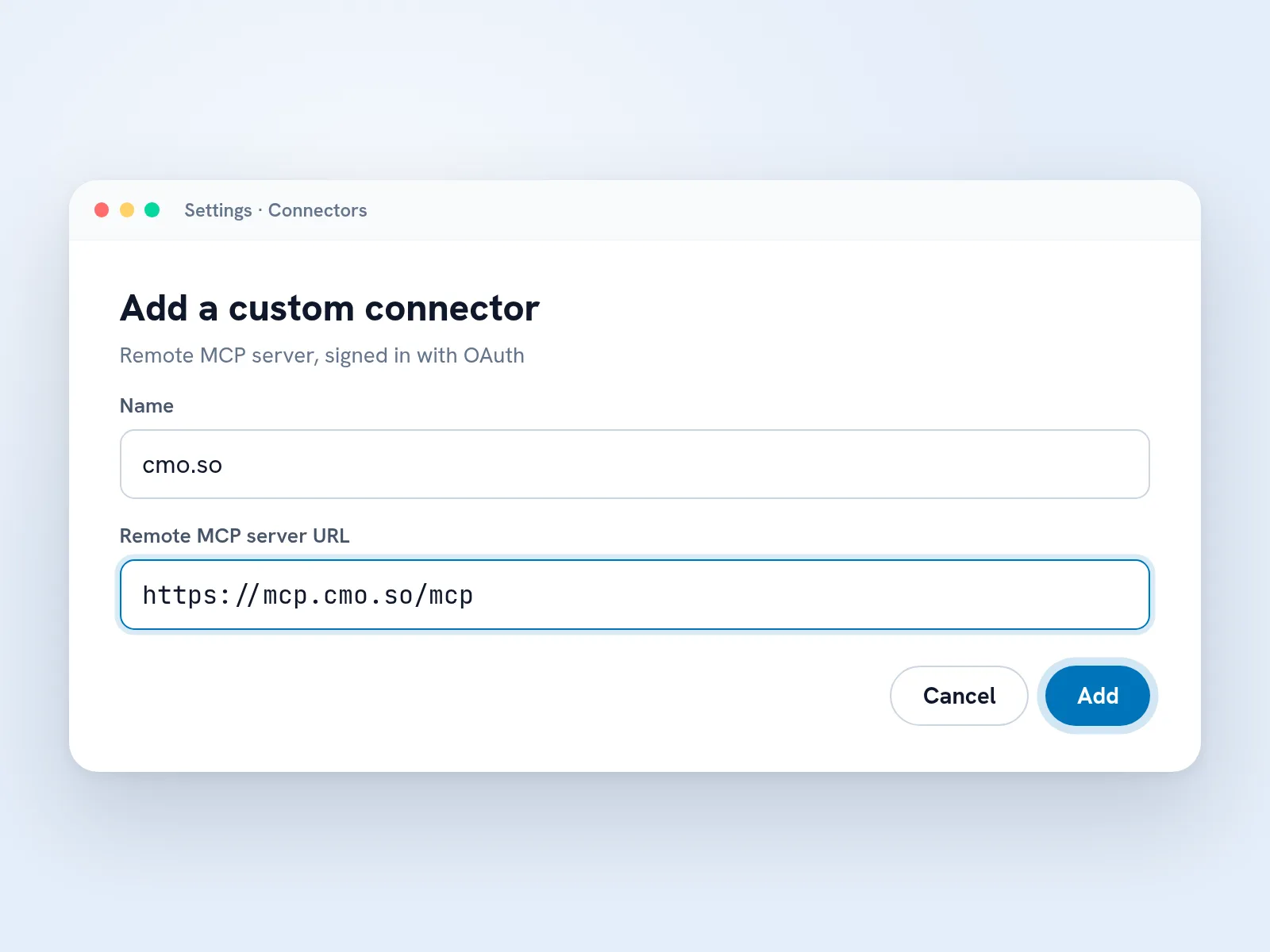
Add the server to your assistant
In your assistant's settings, add a custom connector (or remote MCP server). Name it cmo.so and paste https://mcp.cmo.so/mcp as the URL, then press Add. In Cursor, VS Code or Claude Code, paste the snippet from above instead.
Tip Using a local-only tool? Use the Local (stdio) snippet and sign in once with npx @cmo-so/cli login.
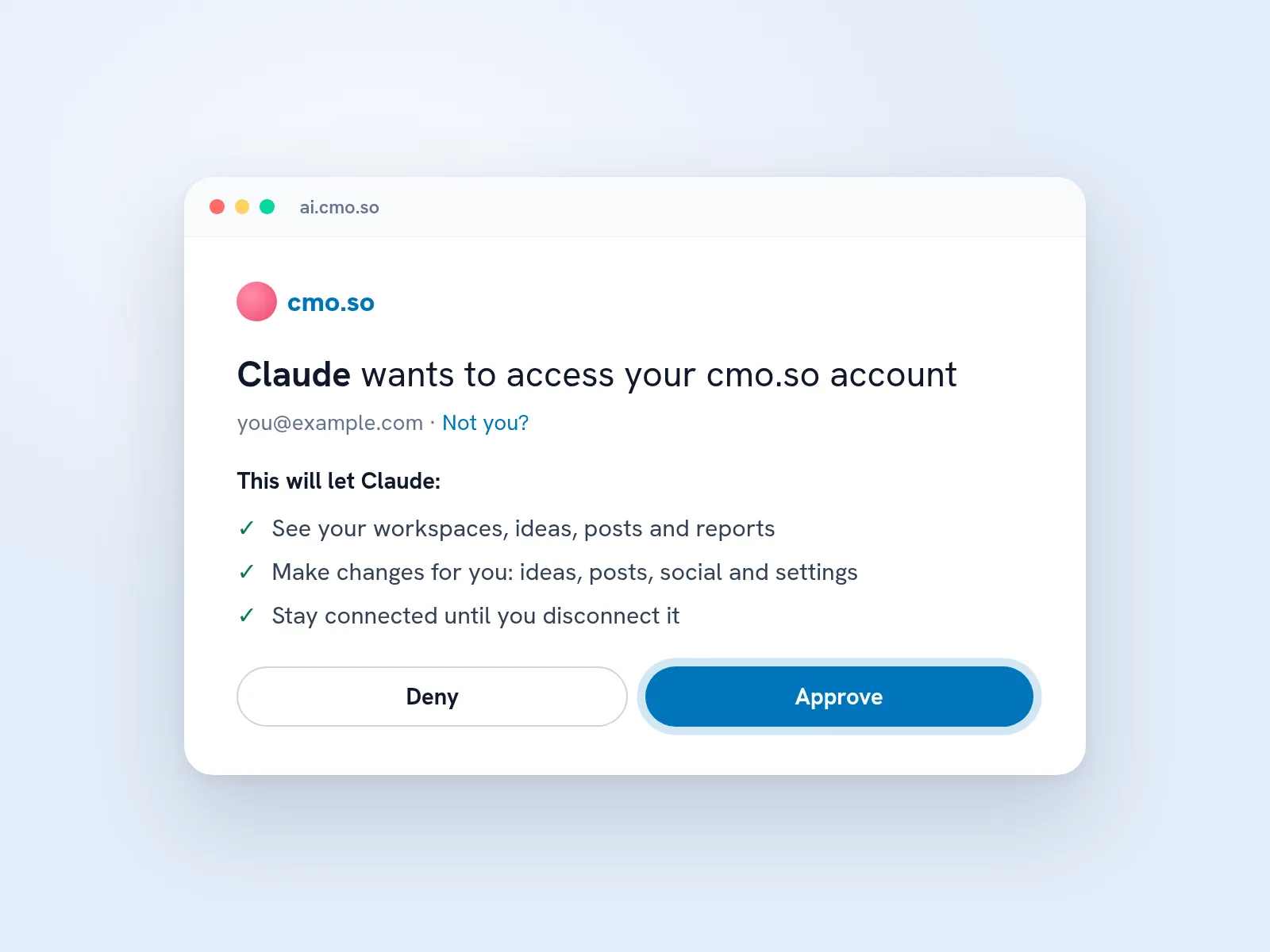
Sign in and approve
The first time a tool is used, a cmo.so page opens. Sign in, check what the assistant will be allowed to do and press Approve. You can disconnect it any time under Connected apps in your cmo.so account.
Tip The access stays until you disconnect it, so you only do this once per assistant.
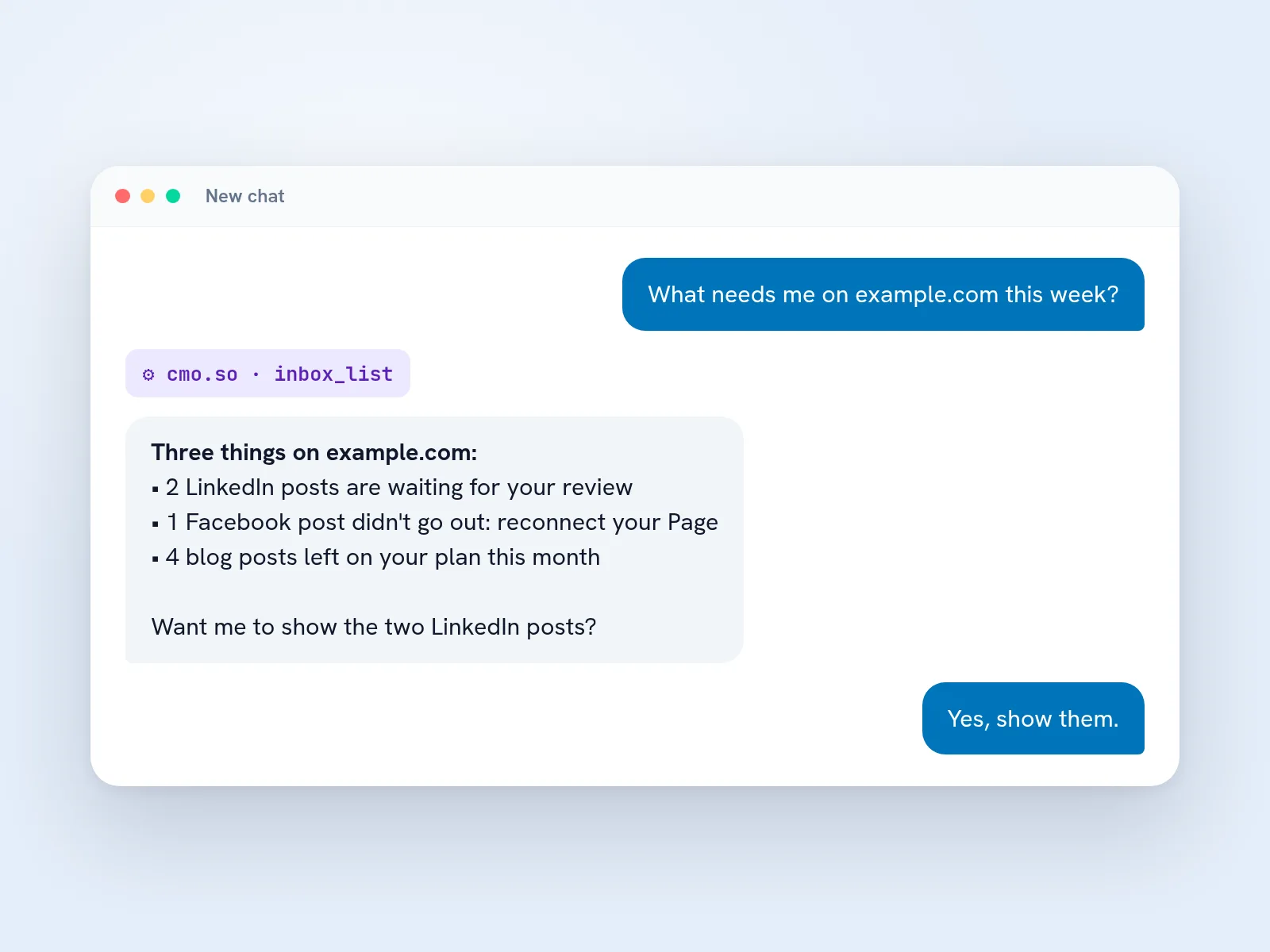
Ask in your own words
Ask what needs you, how your posts did or what to write next. The assistant picks the right cmo.so tool, such as inbox_list, and answers with your real data. With more than one website, name the one you mean.
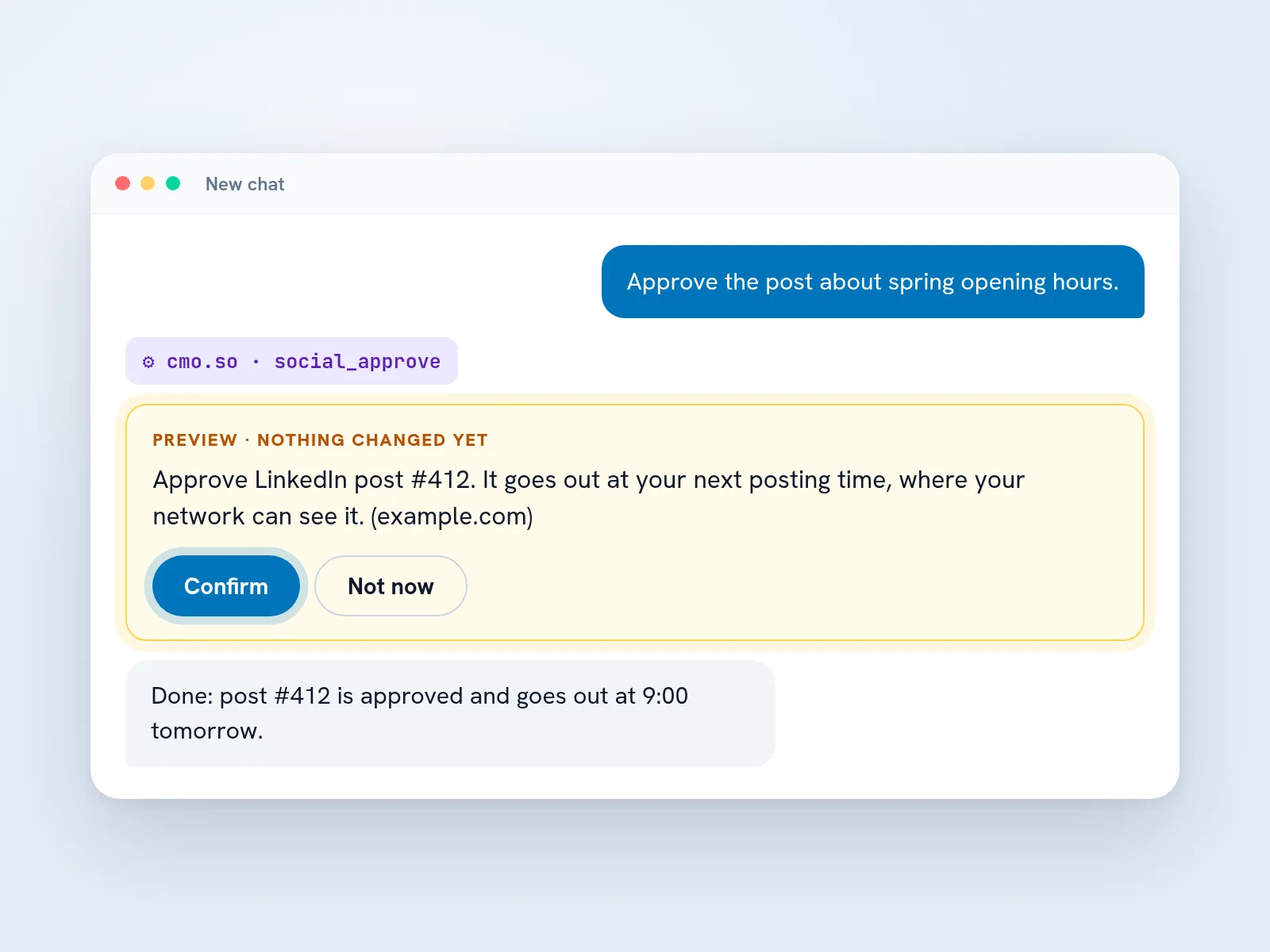
Check the preview, then confirm
When you ask for a change, the assistant shows exactly what will happen, and any cost such as an AI generation, before anything runs. Say yes and it confirms; say no and nothing changes.
Tip A preview's confirmation only works for those exact details and expires after 10 minutes.

A Monday without opening another dashboard
Priya runs a small design studio and spends most of the day in Claude. On Monday she asks it what needs her on her website this week. Two LinkedIn posts are waiting for her review, so she reads both posts in the chat, asks for a shorter opening on one and approves them.
Before lunch she asks which pages get clicks but rank on page two. Maggie points to an old pricing guide, and Priya asks for three fresh ideas around it. The preview says it will use three AI generations; she confirms, and the ideas are in her plan for the autopilot to write.
She never opened another tab. Everything she approved shows up in the cmo.so app as usual, and her teammate sees the same queue on his phone.
The cmo.so MCP server at a glance
- Hosted URL
- https://mcp.cmo.so/mcp (Streamable HTTP), signed in with OAuth
- Local
- npx -y @cmo-so/mcp (stdio), signed in with the cmo.so CLI or CMO_API_KEY; Node 20 or later
- Works with
- Claude.ai, Claude Desktop, Claude Code, ChatGPT, Cursor, VS Code and other MCP clients
- Changes
- Two calls: a preview first, then confirm: true with that preview's confirmation (bound to the exact details, 10 minutes)
- Websites
- Most tools take workspace (your website's domain); leave it out when you have one website
- Prompts
- weekly-review, plan-linkedin-week and refresh-old-posts
- Rate limit
- 120 requests a minute per key
- Never offered
- Buying or changing plans; your keys and other people's data are never returned
- Licence
- MIT, published on npm as @cmo-so/mcp
Things to know before you connect
Your assistant should show the preview
Good clients show the preview and ask before confirming. If yours confirms on its own, tell it to always ask you first, or use a read-only key.
Limits follow your plan
Posts per day, AI generations and Maggie's daily messages are the same as in the app. A tool that would go over your plan says so instead of running.
Web content is treated as untrusted
Titles and text taken from web pages are marked as untrusted data, so instructions hidden in a page aren't followed as yours.
Team roles still apply
On a website you share, the tools only do what your role allows. A viewer can read results but can't approve posts.
cmo.so MCP server questions
Still unsure?
What is the cmo.so MCP server?
It's a Model Context Protocol server that gives AI assistants such as Claude, ChatGPT, Cursor and VS Code the same tools Maggie uses in the cmo.so app. Through it, your assistant can read your results and queues and, with your confirmation, make changes such as approving a LinkedIn post or adding blog ideas.
You connect it once, sign in with your cmo.so account, and then simply ask in your own words. The assistant chooses the right tool and answers with your real data, so you can run your marketing from the place you already work.
Do I need to install anything?
No, not for the hosted server. Add https://mcp.cmo.so/mcp as a remote MCP server or custom connector in your assistant and sign in when asked. That's all most people need.
If your tool only runs local servers, use the npm package instead: npx -y @cmo-so/mcp runs it on your computer. It needs Node 20 or later and a one-time sign-in with npx @cmo-so/cli login, or an API key in CMO_API_KEY.
Which assistants does it work with?
The hosted server works with ChatGPT, Claude.ai, Claude Desktop, Claude Code, Cursor and VS Code, and with any other client that supports remote MCP servers with OAuth. The local version works with any client that can start a stdio server from a config file.
The set-up band on this page has a ready snippet for each common tool. If yours isn't listed, look for a setting called custom connector, remote MCP server or MCP servers and use the hosted URL.
Is it free?
The server itself is free and open source under the MIT licence. You need a cmo.so account to use it, and the free plan is enough to start.
What you can do through it follows your cmo.so plan, exactly as in the app: posts per day, AI generations and Maggie's daily messages. The server never sells plans or asks for payment; upgrades only happen in the cmo.so app.
How does signing in work?
The hosted server uses OAuth. The first time your assistant calls a cmo.so tool, a cmo.so page opens where you sign in, see what the assistant will be allowed to do and press Approve. Your password never passes through the assistant.
The connection stays until you disconnect it under Connected apps in your cmo.so account. For the local server, sign in once with the CLI's device code (npx @cmo-so/cli login), or set CMO_API_KEY to a key from your account's API access.
Can the assistant change things without asking me?
Every tool that changes something takes two calls. The first returns a preview of what will happen, with any cost such as an AI generation or a post credit, and changes nothing. Only a second call with confirm: true and that preview's confirmation runs it.
The confirmation is tied to the exact details and expires after 10 minutes, so it can't be reused for something else. Good assistants show you the preview and wait for your yes; if you want to be certain, connect with a read-only API key, which only offers the reading tools.
What can it do?
It covers what Maggie can do in the app: your inbox and results, blog ideas, drafts and posts, the LinkedIn, Facebook, Instagram, Google Business, YouTube and TikTok queues, your brand profile, Search Console and AI visibility, team and Maggie Memory. The reference band above lists every tool, read straight from the server's code.
It also includes three ready prompts, weekly-review, plan-linkedin-week and refresh-old-posts, which your client may show as shortcuts. Buying or changing a plan is the one thing it never offers.
I have more than one website. How does it know which one?
Most tools take a workspace argument, which is your website's domain. If you have one website you can leave it out; with several, just name the website in your question and the assistant passes it along.
You can also ask it to list your websites first. Each website keeps its own permissions, so on a website someone shared with you, the tools only do what your role allows.
Is my data safe?
The server only acts as you, with the access you approved, and only on websites you can see in cmo.so. It never returns passwords, API keys or other people's data, and every change it makes is recorded in Maggie's action log.
Text that comes from web pages, such as an idea's title taken from a link, is marked as untrusted data so your assistant doesn't treat instructions hidden in a page as yours. What your assistant does with the answers is covered by that assistant's own privacy policy.
What's the difference between the hosted and the local server?
They offer the same tools. The hosted server runs at mcp.cmo.so and signs you in with OAuth, so there's nothing to install or update. The local server runs on your computer through npx and uses your CLI sign-in or an API key.
Use the hosted one unless your tool only starts local servers, or you want to pin a version or run it in an environment without a browser, such as a CI job with CMO_API_KEY.
Is there a usage limit?
Each key can make 120 requests a minute to the server, which is far more than a conversation needs. Beyond that, the limits are your plan's: posts per day, AI generations and Maggie's daily messages, the same as in the app.
When a request would go over a limit, the tool says so plainly instead of running, and nothing is charged.
How is it different from Ask Maggie in the app?
It's the same Maggie and the same tools. Ask Maggie is the chat built into the cmo.so app and dashboard; the MCP server brings those tools into the assistant you already use, next to your code, documents and other connectors.
Everything you approve through the server shows up in the app straight away, so you can start a task in Claude and finish it on your phone.
The rest of the toolkit
Bring Maggie into your assistant
Create a free cmo.so account, add your website, then connect https://mcp.cmo.so/mcp. It takes about a minute.
- Free plan, no card needed
- You approve every post
- Cancel any time