Why website performance matters for SEO
Let’s keep it simple. Your website performance is more than just bragging rights on a dashboard. It:
- Impacts user experience – slow pages frustrate visitors.
- Affects bounce rates – laggy load times make people click away.
- Shapes search rankings – Google uses speed as a ranking signal.
- Influences conversions – faster journeys boost sales and sign-ups.
Google’s own data shows that a one-second delay in page load can cut conversions by up to 20%. In other words, if your site feels sluggish, you’re leaving money on the table. And if you’re running a platform like XenForo, you might get a PageSpeed score in the 20s—someone did. Ouch.
Understanding Google PageSpeed Insights
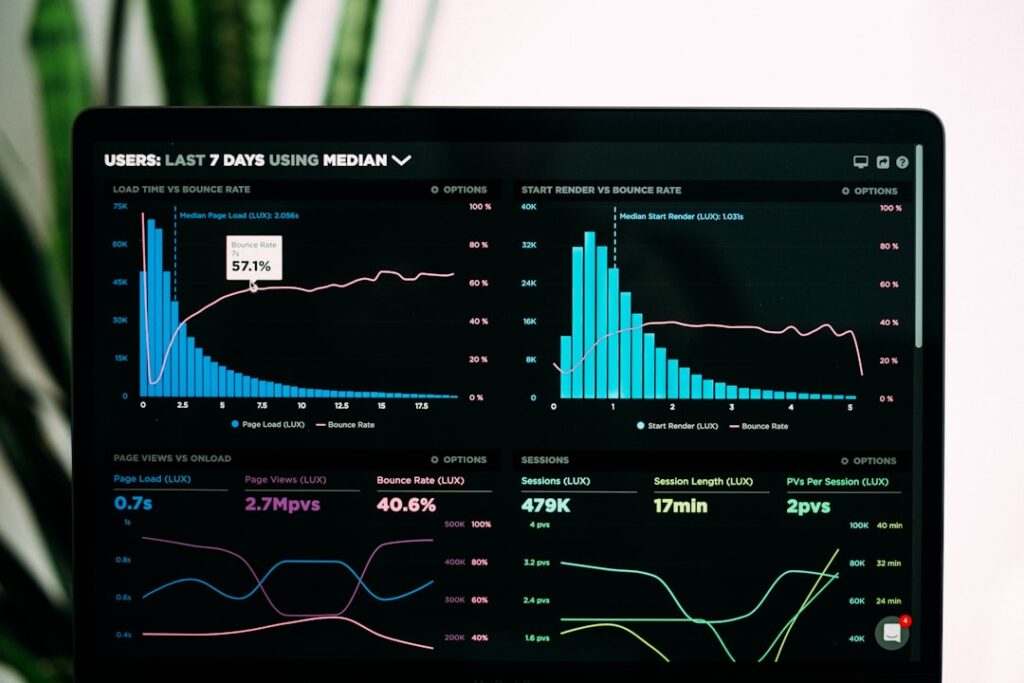
PageSpeed Insights is simple. It grades your site on a scale of 0–100. The score breaks down into:
- Lab Data: Controlled tests in a simulated environment.
- Field Data: Real-world user experiences (Core Web Vitals).
- Opportunities: Actionable suggestions to boost speed.
- Diagnostics: Detailed insights into code and resource issues.
A low score? Don’t panic. It just points you at cheap wins and serious chores. Even non-techies can tackle many of these.
Common speed bottlenecks
Before you dive in, identify what’s slowing you down. Typical culprits include:
- Heavy images that hog bandwidth.
- Render-blocking CSS and JavaScript.
- Unoptimised ads and third-party scripts.
- No caching strategy on your server.
- Bloated themes or page builders.
Take that XenForo example. Ads and unminified assets tanked the score. But you don’t need a developer to fix basic issues.
Quick wins for non-coders
If you’re thinking, “Coding isn’t my jam,” you’re in good company. Here’s where you start:
1. Optimise images
– Use tools or plugins to compress JPGs and PNGs.
– Switch to WebP where possible.
– Implement lazy loading so images load only when needed.
2. Enable browser caching
– Many hosts have a one-click setting.
– Assets like CSS and images stay in users’ cache for longer.
3. Minify and combine
– CSS and JS can be minified with plugins.
– Combining files reduces HTTP requests.
4. Use a CDN
– Offloads assets to servers around the globe.
– Cuts latency for international visitors.
5. Trim third-party scripts
– Question every widget you add.
– Remove unused analytics or social embeds.
These steps alone often boost your website performance score by 20–30 points. Quick, right?
How CMO.SO helps you level up
You’ve got the basics. Now, how do you keep track and stay motivated? Enter CMO.SO.
- Maggie’s AutoBlog: This AI-powered platform generates SEO-friendly blog posts that load fast. It even suggests image formats and sizes that won’t kill your site’s load time.
- Community insights: Share your PageSpeed scores and learn from peers tackling similar challenges.
- Visibility tracking: See how performance improvements affect your search rankings in real time.
CMO.SO isn’t just for content. It’s your personal coach for website performance, keeping you on track with:
- Daily automated tips tailored to your domain.
- A friendly community that spots trends and hacks.
- Easy performance reports without staring at code.
With CMO.SO, you don’t need to be a tech guru. You get clear, concise, actionable insights to boost your scores. And yes, it’s designed for SMEs and non-marketers who want real results.
Advanced tips to reduce page load
For those feeling confident, let’s crank it up:
-
Server-side caching & compression
– Use gzip or Brotli.
– Leverage Redis or Varnish if your host supports it. -
Critical CSS inlining
– Inline only the CSS needed for above-the-fold content.
– Defer the rest until after page load. -
Resource hints
– Preconnect to critical origins.
– Preload fonts so text appears instantly. -
Eliminate render-blocking scripts
– Load non-essential JS asynchronously.
– Defer scripts until after page paint. -
Monitor server response time
– Aim for TTFB under 200ms.
– Consider upgrading to a better hosting plan if necessary.
These steps require a bit more tech savvy. But the payoff? A sleek, lightning-fast site that crushes the competition.
Monitoring and tracking your website performance
It’s one thing to make changes. It’s another to keep them. Follow these habits:
- Schedule a monthly PageSpeed Insights check.
- Use real-user monitoring tools to collect Field Data.
- Track Core Web Vitals in Google Search Console.
- Compare before/after in CMO.SO’s dashboard.
Don’t just chase a quick boost. Watch metrics over time. Is your Largest Contentful Paint improving? Are you hitting that golden 2.5-second mark for First Contentful Paint? CMO.SO’s GEO visibility tracking brings all your performance KPIs into one place. No more jumping between platforms.
Wrapping up
Improving your PageSpeed Insights score doesn’t have to mean hiring a developer or rewriting your entire site. Start small. Optimise images. Enable caching. Trim the fat. Then use CMO.SO to:
- Generate content that’s fast and SEO-friendly.
- Tap into community wisdom for fresh ideas.
- Monitor your website performance and search visibility in real time.
A speedy site means happier users, better rankings, and more conversions. Ready to get moving?
Share
Related posts